How Long Do Temporary Emails Last?
Temporary email addresses are designed for short-term use—but many users still wonder:
How long do temporary emails actually last?
The answer depends on the service, the inbox settings, and how the system is designed. In this guide, we’ll explain how long temporary emails last, what affects their lifespan, and how services like temp-email.io manage email expiration safely and automatically.
What Is a Temporary Email Address?
A temporary email address (also called disposable email or temp mail) is a short-lived inbox that allows you to receive emails without using your personal email address. Once the time limit is reached, the inbox and its messages are automatically deleted.
If you’re new, start here:
👉 What Is a Temporary Email Address? (Beginner Guide)
(internal link suggestion: /what-is-temporary-email)
How Long Do Temporary Emails Usually Last?
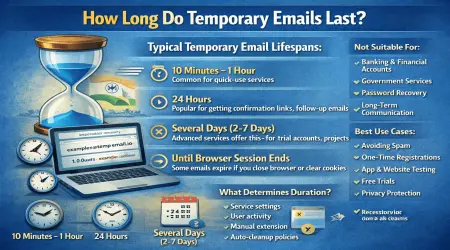
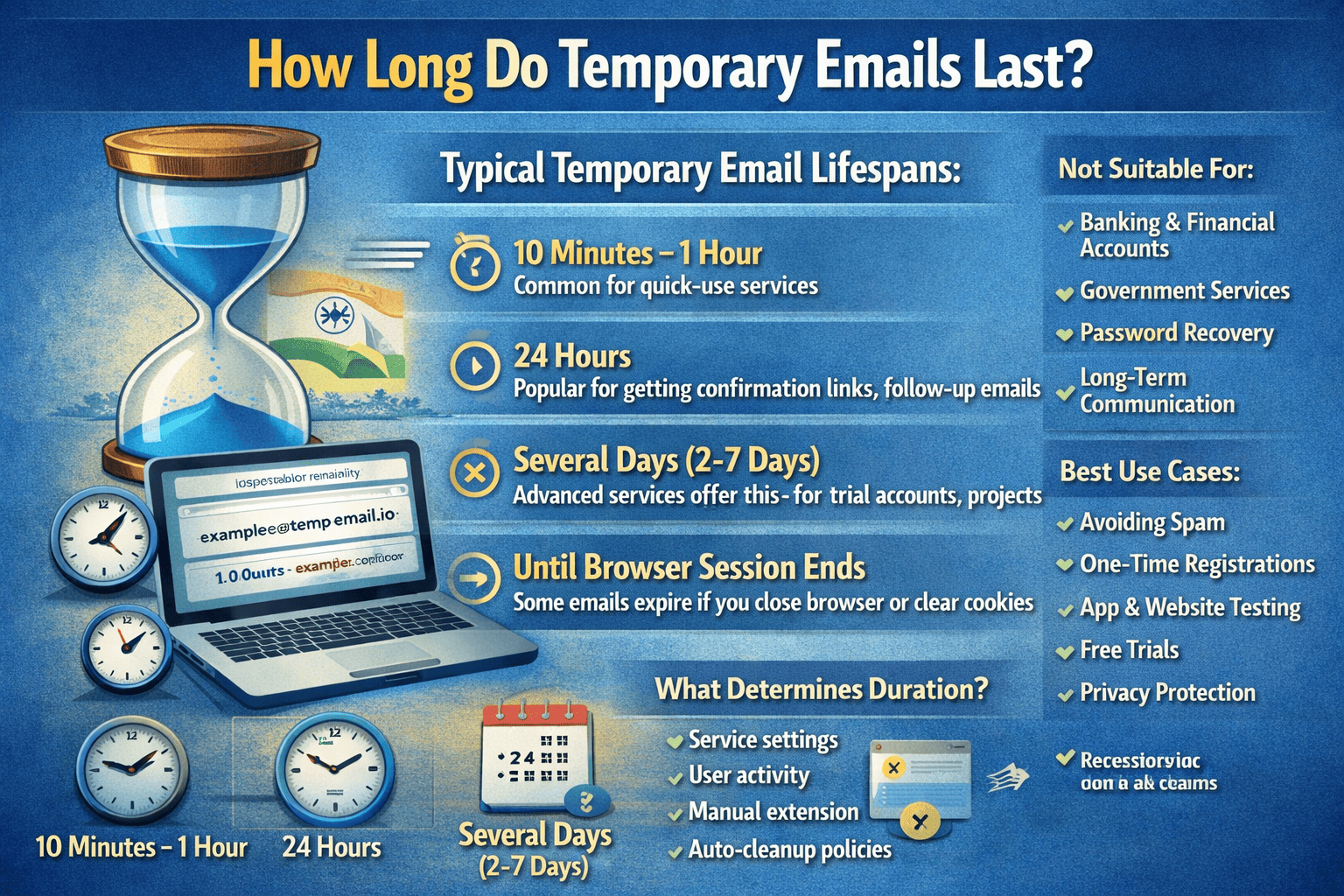
Most temporary email services keep inboxes active for:
10 minutes to a few hours (very short-term services)
Several hours to 1 day (common default)
1–7 days (extended temporary inboxes)
At temp-email.io, inbox lifetime is designed to balance:
User convenience
Privacy protection
Server performance
Once the set time expires, the inbox is automatically removed.
Why Temporary Emails Are Time-Limited
Temporary email is intentionally short-lived. Here’s why:
1. Privacy Protection
Auto-deletion ensures:
Emails don’t stay online forever
Personal data exposure is minimized
Old messages cannot be accessed later
👉 Learn more about privacy-first design:
How Temporary Email Works Behind the Scenes
(internal link suggestion: /how-temporary-email-works)
2. Spam & Abuse Prevention
Short inbox lifetimes help prevent:
Long-term misuse
Permanent fake accounts
Storage abuse
This keeps the service reliable for genuine users.
3. System Performance
Temporary email platforms handle large volumes of messages daily. Automatic cleanup:
Reduces server load
Keeps inbox access fast
Improves overall reliability
What Happens When a Temporary Email Expires?
Once your temporary email expires:
All received emails are permanently deleted
The inbox becomes inaccessible
The email address stops receiving new messages
There is no recovery option after expiration.
👉 Read more about auto-deletion:
Email Lifetime & Auto-Delete
(internal link suggestion: /email-lifetime)
Can You Extend a Temporary Email’s Lifetime?
Some temporary email services allow limited extensions, while others do not.
In general:
Temporary emails are not meant for long-term use
Extension options (if available) are still time-limited
Permanent storage is never offered
For long-term communication, a personal email is always the better choice.
👉 Compare both options here:
Temporary Email vs Personal Email: Key Differences
(internal link suggestion: /temporary-email-vs-personal-email)
When Should You Use Temporary Email Based on Lifetime?
Temporary email is perfect when you need email access for a short duration, such as:
Account verification emails
One-time downloads
Free trials
Forum registrations
Testing websites or apps
👉 Learn best use cases:
When Should You Use Temporary Email?
(internal link suggestion: /when-to-use-temp-email)
Avoid using temporary email for:
Banking
Government services
Important personal accounts
Password recovery-dependent logins
Why Some Emails Disappear Faster Than Expected
If you notice emails disappearing quickly, it could be due to:
Inbox expiration time reached
Browser session cleared
Service cleanup cycle
Inbox being refreshed or regenerated
This behavior is normal and part of temporary email design.
Temporary Email Lifetime vs Personal Email
| Feature | Temporary Email | Personal Email |
|---|---|---|
| Email Duration | Short-term | Long-term |
| Auto-Delete | Yes | No |
| Recovery Option | No | Yes |
| Best Use | One-time tasks | Important accounts |
Is Short Email Lifetime a Disadvantage?
Not really—it’s actually a feature.
Short inbox lifetime:
Improves privacy
Reduces spam risk
Prevents long-term data storage
👉 See the full pros and cons here:
Advantages and Disadvantages of Temporary Email
(internal link suggestion: /advantages-disadvantages-temp-email)
Final Thoughts
Temporary emails are designed to last just long enough to get the job done—and no longer.
Whether it’s a few minutes or a few days, the limited lifetime is what makes temporary email:
Safe
Private
Spam-free
If you need fast, reliable, short-term email access without exposing your real inbox, temp-email.io offers a simple and privacy-focused solution.